


Update — May 2026
The regulation timeline has changed. Spain's Ministry for Digital Transformation has opened a public consultation pointing to a delay of the blocking date from June 7 to September 15, 2026. Registration remains mandatory.
Read the full update →Not sure what the CNMC Alias Registry is or why it's mandatory? Read our full guide to the CNMC 2026 regulation first, then come back here when you're ready to register.
April 24, 2026 is the deadline for Instasent clients to join the bulk registration process — the fastest way to register all your aliases with the CNMC at once, without having to file individually. After that date, the individual process can take up to three months — and from June 7, SMS messages with unregistered sender IDs start getting blocked.
Completing the form in your dashboard takes less than 10 minutes. Here's exactly what you need and how to do it.
Not an Instasent client yet?
Sign up now and we'll handle your alias registration as part of your onboarding — before the June 7 deadline.
Before you start: what to have ready
Company details
Tax ID, legal name, address, phone number and contact email.
Legal representative
Full name, ID document and email. The CNMC may contact them during verification.
Brand link proof
Registered trademark, web domain, company name or declaration of habitual use.
Your current aliases
A list of all alphanumeric sender IDs you currently use in your SMS campaigns.
Important: regulations expressly prohibit Instasent from filling in this data on your behalf. It must come directly from you. Once you submit it, we handle the entire technical process with the CNMC.
Step by step: how to complete the form
Access the registration form
Go to your Instasent dashboard and navigate to Settings → Organization → Legal Profile. Or access it directly: dashboard.instasent.com → Legal Profile.
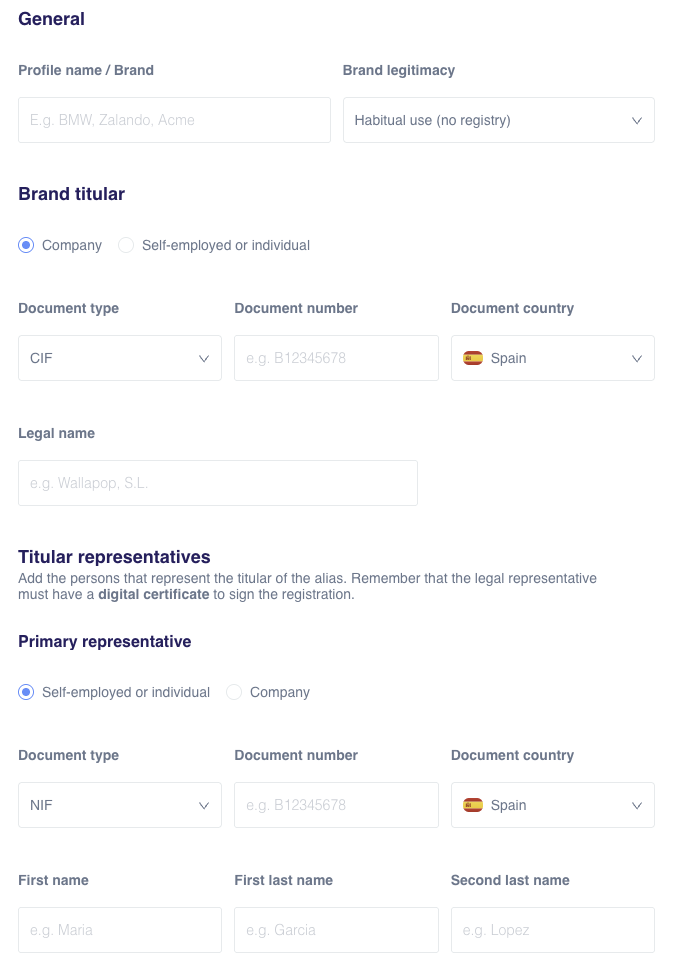
The alias registration form in your Instasent dashboard.
Fill in the alias holder details
Enter the details of the company legally responsible for the alias: entity type, tax ID, legal name, address, phone and email. If you're a sole trader, you are both the holder and the legal representative.
Add the legal representative's details
Enter the full name, ID document and email of the person with legal authority to represent the company. This email is critical: the CNMC may use it to verify the registration.
Specify the link to your alias
Select whichever criterion best applies to your situation:
Submit the form
Once submitted, Instasent receives your information, prepares the official file and files it with the CNMC. You don't need to do anything else. Need help? Check our step-by-step guide in the Help Center.
What happens next?
Don't have an Instasent account?
Create one now and your alias registration will be handled as part of the onboarding process — at no extra cost.
Frequently asked questions
Want to understand the full regulation before registering? Read our complete guide to CNMC Circular 1/2026.
You have until April 24 to submit your data. We handle everything else. Log in to your dashboard at Settings > Organization > Legal Profile and complete the form now. Any questions? Contact us with the subject "CNMC Registration" and we'll guide you through it.

